Security software guide
Avast antivirus explained: what it does, what it costs and who owns it now
Advertising disclosure
This article contains partner links. If you follow one and buy something, Canadian Cleaning Company s.r.o. — the company that publishes this site — receives a commission from the vendor. You pay exactly the same price; the commission comes out of the vendor's margin.
Commission does not buy coverage, wording or placement here. Nothing in the assessment below was shown to or approved by any vendor before publication. Where we think the product is a poor fit for a reader, we say so — there are several places below where we do. Our editorial policy sets out exactly what we will and will not do for money.
Avast is one of the best-known names in consumer security software, and one of the most argued-about. This guide sets out what the product family actually contains in 2026, how the underlying technology works, what the company's documented history with user browsing data was and how it was resolved, and — the question most buying guides skip — whether you need to install anything at all beyond what is already on your computer.
The short version
- The free tier is a real product, not a time-limited trial. It provides on-access malware scanning and automatic updates at no cost for personal use.
- The brand is no longer an independent Czech company. Avast is operated under Gen Digital, the company formed after NortonLifeLock acquired Avast in 2022. The privacy terms you accept are Gen Digital's.
- There is a real privacy episode in its history. In 2024 the US Federal Trade Commission announced a settlement with Avast over the sale of users' browsing data through a subsidiary. We cover it in full below rather than omitting it.
- Most people's biggest risk is not a virus. It is a convincing message, a reused password, or a browser that has not been updated. Software helps with one of those three.
- Check the vendor's own page before paying. Tiers, device counts and included tools change frequently. Where anything here diverges from what Avast or Gen Digital publish, their information prevails.
Want to look at the current offer while you read?
Tiers and device counts change often. The vendor's own page is the only authoritative source for what is included today and what it costs in your country.
See the current Avast plans Partner linkThis is a partner link. If you buy after following it, Canadian Cleaning Company s.r.o. earns a commission from the vendor. It costs you nothing extra and it does not change what is written above.
What Avast is, and who runs it today
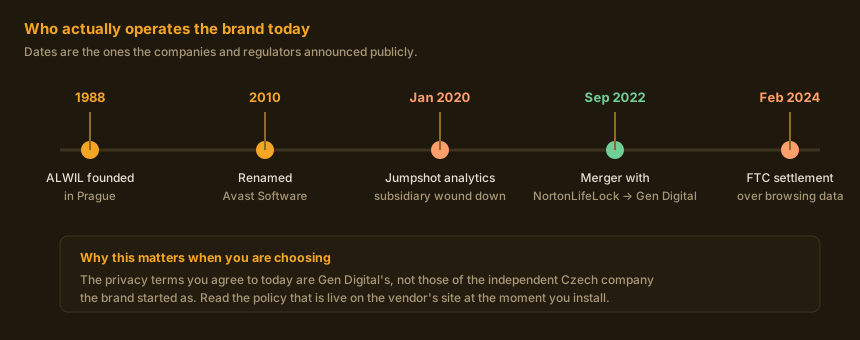
Avast began as ALWIL, a cooperative founded in Prague in 1988 by Pavel Baudiš and Eduard Kučera, and it built its reputation on a free antivirus product at a time when free antivirus was unusual. The company was renamed Avast Software in 2010 and listed on the London Stock Exchange in 2018.
What matters more for a buying decision is what happened next. In September 2022 NortonLifeLock completed its acquisition of Avast; the combined business subsequently took the name Gen Digital, which today also owns Norton, Avira, AVG and LifeLock. Avast is now a brand within that group rather than an independent company. The engineering presence in Prague remains, but the corporate entity you contract with, and the privacy policy you accept when you install, belong to Gen Digital.
The current consumer line-up is, broadly: Avast Free Antivirus, the no-cost tier; Avast Premium Security, the paid antivirus suite; and Avast One, a bundle that combines protection with a VPN and some maintenance and monitoring tools. Avast SecureLine VPN is also sold on its own. Two things that older articles still list have gone: the standalone Avast Passwords manager was discontinued at the start of the decade, and Avast Cleanup has always been a separate purchase rather than part of the antivirus suite.
How a scanning engine actually decides
Marketing copy tends to describe antivirus as a single thing that either catches a threat or does not. In practice every mainstream engine, Avast's included, runs a file through a series of increasingly expensive checks and stops at the first one that reaches a confident answer.
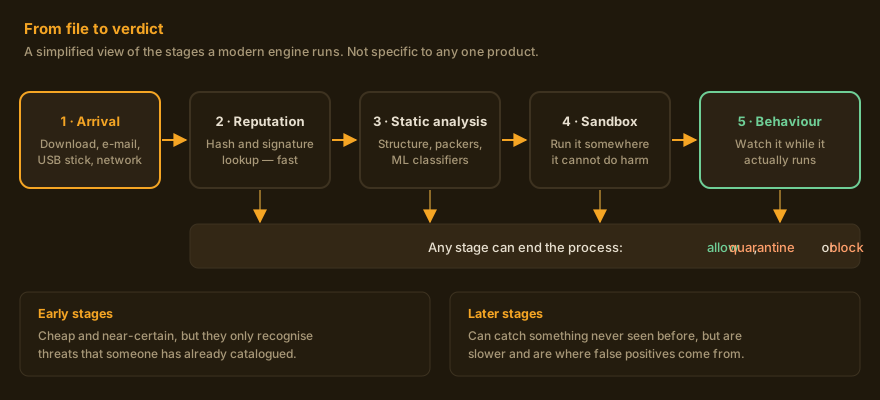
The first stage is cheap and nearly certain: the file's cryptographic hash is compared against lists of things already known to be malicious or already known to be fine. This catches the overwhelming majority of what an ordinary user encounters, because most malware is a redistribution of something already catalogued.
The later stages are where the interesting trade-off lives. Static analysis and machine-learning classifiers look at a file's structure — how it is packed, what functions it imports, how closely it resembles families the model was trained on — and can flag something never seen before. Behaviour monitoring watches a program while it runs and intervenes when it starts doing things like enumerating your documents folder and rewriting every file in it. Those stages are what stops a genuinely novel attack. They are also the entire reason false positives exist: a small utility written by one person, unsigned and compressed with an unusual packer, looks statistically a lot like malware.
A practical consequence
If a security product blocks something you are confident is legitimate, the correct response is neither to disable protection nor to assume the product is right. Submit the file to the vendor as a suspected false positive, and check it against a second opinion before you override anything. A detection you overrode is worth nothing.
Where infections actually come from
It is worth being concrete about the threat you are buying protection against, because the honest answer changes what you should spend money on.
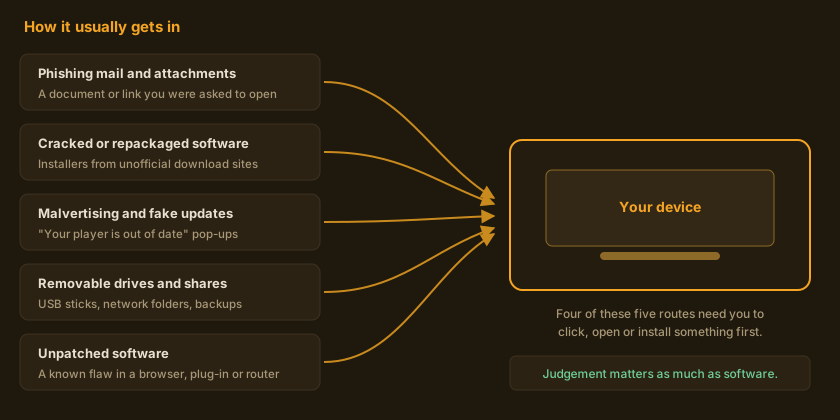
Notice what that implies. A scanning engine sits in the path of all five routes, but it is the last line on four of them. The decision to open the attachment, to download the installer from a site that was not the vendor's, or to click “update now” on a prompt that appeared inside a web page, has already been made by the time the engine is consulted. This is not an argument against antivirus; it is an argument for not treating it as the whole of your defence.
The fifth route — unpatched software — is the one that needs no mistake from you at all, and it is also the one that costs nothing to close. Enabling automatic updates for your operating system, your browser and your browser extensions removes a whole category of risk that no security product fully compensates for.
Free tier versus paid tiers
The most common question about Avast is whether the free version is a real product or a crippled advertisement for the paid one. It is a real product: the malware detection engine in the free tier is the same engine, with the same definition updates, as the one in the paid suites. What you are paying for when you upgrade is not better detection.
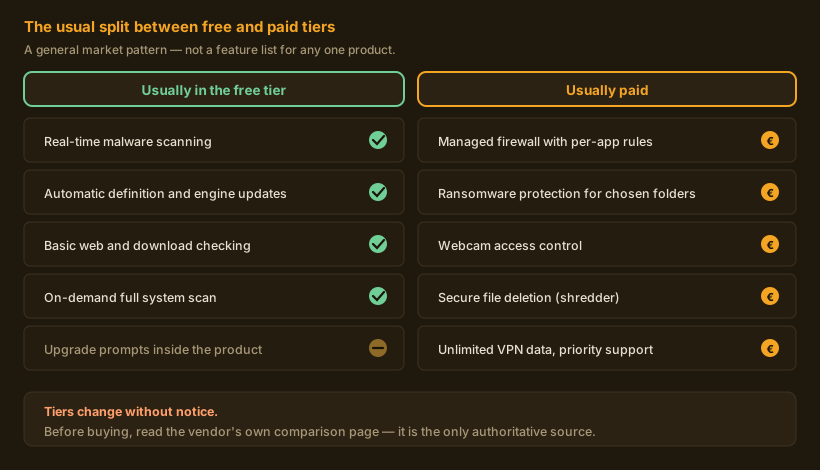
For Avast specifically, the paid suite has centred on a managed firewall, ransomware protection for folders you nominate, webcam access control, secure file deletion, and protections against fraudulent sites and unauthorised remote access. The exact composition differs by platform — several of those are Windows-only — and by plan, and it changes. Avast One layers a VPN and breach monitoring on top.
What we will not tell you
We do not quote prices, discount percentages or device counts in this article. Those change between countries, between renewal and first-year rates, and from one week to the next; a number written here in September 2026 would be wrong by the time you read it, and a wrong price is worse than no price. Read them on the vendor's own checkout page, where they are binding.
Compare the tiers on the vendor's own page
Feature lists and device limits are set by the vendor and change without notice. Their comparison page is the authoritative version.
Check what is in each Avast tier Partner linkThis is a partner link. If you buy after following it, Canadian Cleaning Company s.r.o. earns a commission from the vendor. It costs you nothing extra and it does not change what is written above.
The privacy record you should know about
A security company asks for extraordinary access: a scanning engine sees every file you open and, through a browser extension, potentially every page you visit. That makes the company's own data practices part of the product, and Avast's history here is genuinely relevant.
Avast operated a subsidiary called Jumpshot, which packaged and sold analytics derived from data collected through Avast's products. Following reporting in January 2020, Avast announced it was winding Jumpshot down. In February 2024 the US Federal Trade Commission announced a settlement: Avast agreed to pay 16.5 million US dollars, and was barred from selling or licensing browsing data from its own branded products for advertising purposes, alongside deletion and notification requirements. The Czech data protection authority (ÚČÚ, the Úřad pro ochranu osobních údajů) also pursued the matter under the GDPR and announced a fine; because such decisions can be appealed, check the authority's own published decisions for the current status.
What we changed, and why
An earlier version of this page stated that “Avast does not sell your personal data to third parties” as a plain fact. That claim was wrong in light of the FTC's findings and has been removed. We have replaced it with the account above. We would rather lose a sale than leave a false reassurance on the page.
How much weight to put on this is a judgement, and we will give ours rather than hide behind neutrality. The conduct was real and it was serious. It was also addressed through an enforceable order, and the company operating the brand today is a different corporate entity under a binding settlement. We do not think the history disqualifies the product. We do think it means you should read the current privacy notice and the data-sharing toggles during installation rather than accepting the defaults, and that anyone for whom browsing confidentiality is critical should weigh it explicitly.
Practical step, whichever product you choose: after installing, open the settings and look for the section governing data sharing, “product improvement” telemetry and third-party offers, and turn off what you do not want. These are usually on by default and are usually easy to change.
The VPN question
A VPN is bundled into Avast One and sold separately as SecureLine. Bundled VPNs are heavily marketed, and the marketing is frequently misleading — not specifically Avast's, but the category's. It is worth being precise about what the technology does.
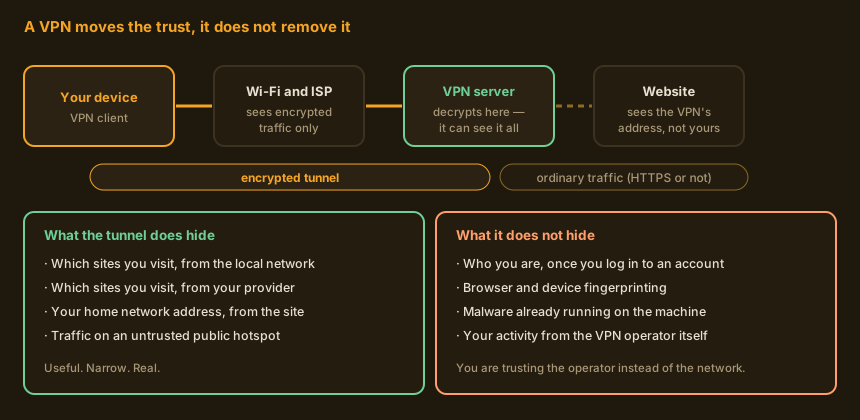
A VPN moves your traffic through an encrypted tunnel to a server run by the VPN operator, and out to the internet from there. Inside the tunnel, the network you are physically on — a café hotspot, a hotel, your internet provider — can see that you are connected to a VPN and how much data is moving, but not which sites you are reading. The site you visit sees the VPN server's address instead of yours.
What it does not do: it does not make you anonymous. The moment you log in to any account, that account knows who you are. It does not prevent browser fingerprinting. It does not remove malware already on the machine. And it does not eliminate the need to trust someone — it moves that trust from your internet provider to the VPN operator, who is now the party in a position to observe your traffic. Given the section above, that is a choice to make deliberately rather than by accepting a bundle.
One more correction worth making, because the figure circulates widely: the classic paid antivirus suite has generally not included unlimited VPN data. Free and bundled tiers have historically carried an allowance cap. The current allowance, if any, is stated on the vendor's plan page — treat any specific gigabyte figure you read in a third-party article, including an older version of this one, as unreliable.
What antivirus cannot do for you
If you take one thing from this article, make it this section. Security software is one layer among several, and it is not the layer that saves you in the worst case.
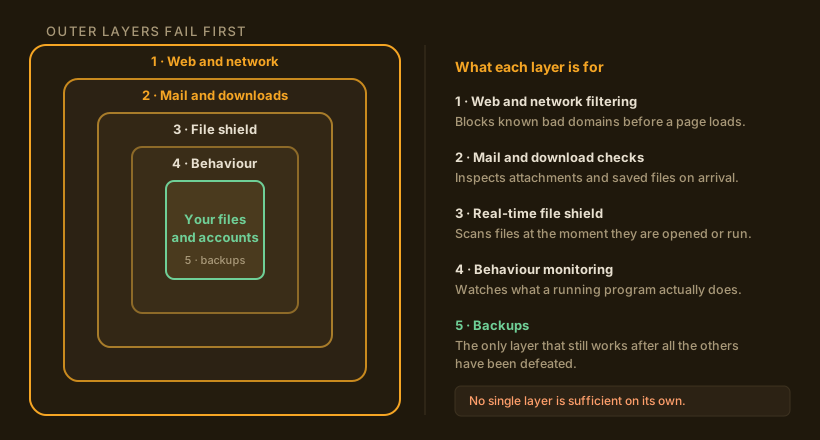
Backups. Ransomware is the scenario where an antivirus product either works perfectly or is irrelevant. A backup that is disconnected or versioned — an external drive you unplug, or a cloud service that retains previous versions of files — converts a catastrophe into an afternoon's inconvenience. No detection rate substitutes for it.
Unique passwords and two-factor authentication. The most common way ordinary people lose an account is not malware. It is a password reused on a site that was breached. A password manager and a second factor on your email account address a larger share of real-world risk than any antivirus feature, and both are available free.
Updates. Automatic updates for the operating system, browser and extensions close the one attack route that needs no mistake from you.
Your own judgement. Which brings us to the next section.
Reading a phishing message
Filters catch a great deal of phishing and will never catch all of it. The skill of reading a message sceptically is therefore worth more than any single product feature, and it takes about two minutes to learn.
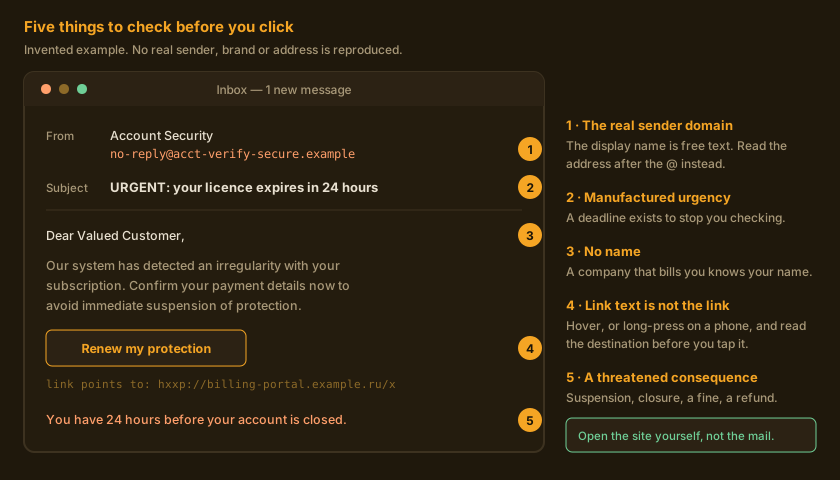
The display name on a message is free text that anyone can set. The part that is hard to fake
is the domain after the @, and on most mail clients you have to tap or click the sender to
see it. Urgency and a threatened consequence are the two most reliable signals: a real company that
wants money from you is content to wait, because it has your account. A greeting that avoids your name
suggests the sender does not have it.
The single habit that defeats nearly all of it: never act inside the message. If your bank, or your antivirus vendor, appears to need something from you, close the message, open the site yourself from a bookmark or by typing the address, and log in there. If the request is genuine it will be waiting for you. If it is not, you have lost nothing.
Installing and configuring it sensibly
Whatever you install, a few steps make the difference between a product that helps and one that gets in the way.
- Download from the vendor's own domain. Search results for popular security software are a standing target for imitation sites and for installers repackaged with additional software. Type the address or use a bookmark.
- Uninstall the previous suite first. Two real-time scanners on one machine fight each other, and the symptoms — freezes, files that will not open, scans that never finish — look like hardware failure. Most vendors publish a dedicated removal tool; use it rather than the ordinary uninstaller.
- Read the optional components. Installers commonly offer a browser extension, a rebranded browser and a set of data-sharing consents on the same screen, pre-ticked. Untick what you did not come for.
- Go through the privacy settings straight away. Turn off product-improvement telemetry, third-party offers and any data-sharing toggle you are not comfortable with, before you forget.
- Set a scan schedule you will actually keep. Real-time protection does the work; a periodic full scan at a time when you are not using the machine is a reasonable belt-and-braces measure.
- Note the renewal date. Security subscriptions typically auto-renew at a rate higher than the introductory one. Put the date in a calendar the day you buy, so the decision to continue is yours.
If you are setting up for a relative
Turn on automatic operating-system updates, set up a backup that runs without anyone remembering to start it, and make sure their email account has a second factor. Those three things, done once, prevent more grief than any product choice.
Alternatives, including the one you already have
An honest guide has to name the free option that is already installed. On Windows, Microsoft Defender is built in, enabled by default, updated through Windows Update, and has for several years performed respectably in independent laboratory testing. For a careful user who keeps their system patched and does not install software from unofficial sources, it is a legitimate answer, and we are not going to pretend otherwise in order to sell a subscription.
The case for a third-party suite is mainly about the extras and the interface: folder-level ransomware controls, webcam permissions, a firewall with readable per-application rules, protection across Windows, macOS and Android from one subscription, and a support line when something goes wrong. Whether that is worth an annual fee depends on how many devices you are responsible for and how confident you are about the habits of the people using them.
| Your situation | Reasonable choice | The thing that matters more |
|---|---|---|
| One Windows machine, careful user, everything patched | Built-in Defender is defensible | Backups and a password manager |
| Family with several devices and mixed habits | A paid multi-device suite earns its fee | Automatic updates on every device |
| You want more than the built-in tool but will not pay | A reputable free tier, Avast's among them | Reading the privacy toggles at install |
| Browsing confidentiality is critical to you | Choose the security vendor and the VPN operator separately | Who you are choosing to trust, and why |
| Machine already behaving strangely | A scan from a second, separate tool | Changing passwords from a different device |
Who this is actually for
Avast Free Antivirus is a sensible pick if you want a second opinion alongside or instead of the built-in tool, you are on a platform where the built-in options are weaker, or you simply prefer its interface. It is free, it is a complete product, and the cost of trying it is an hour and a careful read of the installer screens.
The paid suites make sense when you are responsible for several devices and several people, or when you specifically want the firewall, ransomware-folder and webcam controls in one place with support attached. They make less sense if you are a single careful user on an up-to-date Windows machine, and we would rather say that plainly than sell you something you will not use.
If your motivation for reading this was a pop-up telling you that your computer is infected and you must act within a few minutes: that pop-up is the threat. Close the tab. Nothing that appears inside a web page can know the state of your computer.
Ready to look at it yourself?
The vendor's page carries the current tiers, the countries served and the binding price. Read the plan comparison and the privacy notice before you buy.
Open the current Avast offer Partner linkThis is a partner link. If you buy after following it, Canadian Cleaning Company s.r.o. earns a commission from the vendor. It costs you nothing extra and it does not change what is written above.
Questions readers ask
Is Avast Free Antivirus genuinely free?
Yes, for personal, non-commercial use. It is a complete product with on-access scanning and automatic updates rather than a time-limited trial. It does prompt you to upgrade inside the interface; that is how the free tier is paid for.
Does the paid version detect more malware than the free one?
The detection engine and the definition updates are the same. The paid tiers add other components — firewall, ransomware folder protection, webcam control, secure deletion — rather than a better scanner.
Will it slow my computer down?
Any real-time scanner costs something, most visibly during a full scan or when copying many files at once. On current hardware the effect is usually small; on an older machine with a mechanical hard disk it can be noticeable. Independent laboratories publish performance measurements alongside protection scores, and those are a better guide than any vendor's claim, including a claim repeated here. We do not quote a figure because it depends entirely on your machine.
Can I trust Avast with my data after the FTC case?
That is your judgement to make, and it is a reasonable question to ask. The facts: browsing data was sold through a subsidiary, the subsidiary was wound down in 2020, and the FTC announced a settlement in 2024 that included a payment and a ban on selling browsing data from Avast-branded products for advertising. The brand is now operated by Gen Digital under that order. Read the current privacy notice and set the data-sharing toggles yourself rather than accepting defaults. See the section above.
Do I need antivirus on a Mac, an iPhone or an Android phone?
The risk profile differs by platform and is not the same as on Windows. On mobile, the main practical risks are applications installed from outside the official store, permissions granted too freely, and phishing — none of which a scanner is the primary answer to. Mobile security apps are mostly bundles of web filtering, breach alerts and a VPN. Judge them on those components, not on the word “antivirus”.
Should I run two antivirus products at once?
No. Two real-time scanners interfere with each other and can produce symptoms that look like a failing computer. An on-demand second-opinion scanner that does not install a real-time shield is a different matter and is safe to use occasionally.
What is the difference between Avast and AVG?
Both are brands within Gen Digital, which also owns Norton and Avira. AVG was acquired by Avast in 2016 and the products have shared technology since. Treat them as two front-ends within one group rather than as independent alternatives to each other.
How is this page paid for?
By commission on the partner links. If you buy after following one, the vendor pays us a percentage; your price is unchanged. No vendor sees or approves this page before publication. The editorial policy sets out the rules we hold ourselves to, and how we review explains the method.
Sources
Where a statement here concerns a company action or a regulatory decision, it is taken from the primary announcement rather than from another article. We link the originals so you can check them.
- US Federal Trade Commission, press release and case materials on the Avast settlement, February 2024 — ftc.gov press releases and the FTC's case index.
- Úřad pro ochranu osobních údajů (Czech data protection authority), published decisions and press section — uoou.cz.
- Gen Digital Inc., corporate history and investor announcements on the NortonLifeLock–Avast combination — gendigital.com.
- Avast product, plan comparison and support documentation, and the current privacy notice — avast.com.
- Independent testing laboratories for protection, performance and false-positive measurements — AV-TEST and AV-Comparatives, both of which publish their methodology and their raw results.
- Microsoft documentation for Microsoft Defender Antivirus — learn.microsoft.com.
Precedence, and how to correct us
Product composition, plan names, device limits and prices are set by the vendor and change without notice. Where anything on this page diverges from the information published by Avast or Gen Digital, the vendor's own information prevails. This article is independent commentary and is not a vendor document.
If you believe something here is wrong, write to info@veldator.online. We correct factual errors and mark the correction on the page. The procedure is in our editorial policy.
All figures on this page are original diagrams created by Veldator Guide for this article. They contain no vendor screenshots, logos or stock photography. They are illustrative and are not reproductions of any product interface.
Trademark notice: Avast, Avast One, AVG, Norton and Gen Digital are trademarks of their respective owners. Canadian Cleaning Company s.r.o. and Veldator Guide are independent and are not affiliated with, endorsed by, sponsored by or otherwise connected to Gen Digital Inc., Avast Software s.r.o. or Microsoft Corporation. Product names are used for identification only.